SXM vs PCIe for GPU Servers
SXM and PCIe are two different ways to connect the same GPU chip to the rest of the server. PCIe is the older, widely adopted standard, but it was never designed for multi-GPU workloads. SXM is NVIDIA's proprietary interface that allows you to connect multiple GPUs at 900 GB/s versus ~128 GB/s over PCIe 5.0, a 7x bandwidth advantage. Unless you're running a workload that fits on a single GPU or the interconnect between GPUs is not a bottleneck, you most likely want an SXM system.
Same chip, different connector
An H100 SXM and an H100 PCIe use identical silicon, manufactured on the same TSMC process. The difference is how the chip connects to the rest of the system, but that difference alone can mean 2x or more in real-world throughput depending on the workload.
PCIe (Peripheral Component Interconnect Express) is the standard expansion slot in every server and desktop. It is how gaming PCs connect graphics cards, how servers attach network cards and storage controllers. The standard has been around for two decades.
SXM (Server PCI Express Module) is NVIDIA's proprietary high-performance GPU socket. You cannot plug an SXM GPU into a standard motherboard. SXM modules mount onto a specialized baseboard by NVIDIA called HGX, a dedicated board with high-speed wiring between GPU positions built in. [3]NVIDIA HGX Platformhttps://www.nvidia.com/en-us/data-center/hgx/ It holds 4 or 8 GPUs wired through NVSwitch, a chip on the baseboard that gives every GPU a direct path to every other GPU through NVLink, NVIDIA's high-speed GPU-to-GPU interconnect. [2]NVIDIA NVLink and NVLink Switchhttps://www.nvidia.com/en-us/data-center/nvlink/
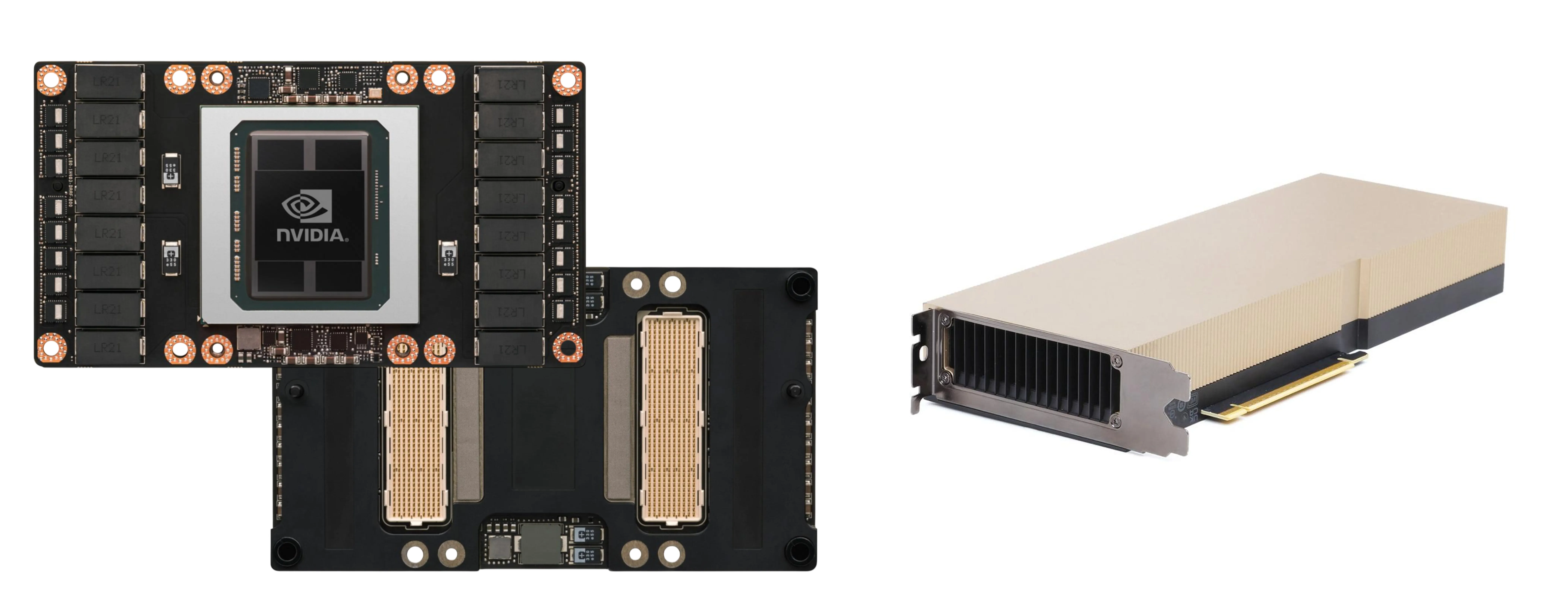
Right: PCIe card, a standard enclosed card with a gold PCIe edge connector along one side. Slots vertically into any server or workstation with an x16 slot.
The SXM socket enables two things beyond NVLink: higher power delivery and better cooling per GPU. [1]NVIDIA H100 Tensor Core GPU Datasheethttps://www.nvidia.com/en-us/data-center/h100/ HGX baseboards deliver dedicated high-wattage power to each GPU, while standard server motherboards distribute power across CPU, memory, and storage. The flat module design means a cold plate sits directly on the chip, making it practical to cool 700W+ per GPU.
That extra power headroom lets NVIDIA run faster memory and higher clocks on SXM cards. The H100 SXM ships with HBM3 at 3.35 TB/s of memory bandwidth versus 2.0 TB/s on the PCIe variant, and about 30% higher FP8 throughput thanks to more active streaming multiprocessors and higher clock speeds.
Why bandwidth matters
Training large AI models means splitting work across multiple GPUs. Those GPUs exchange data constantly, syncing intermediate results after every training step. The speed of that exchange determines whether your GPUs spend their time computing or waiting.
SXM GPUs on an HGX baseboard communicate through NVLink. On Hopper-class systems, NVLink 4.0 provides 900 GB/s of bidirectional bandwidth per GPU. [2]NVIDIA NVLink and NVLink Switchhttps://www.nvidia.com/en-us/data-center/nvlink/ PCIe 5.0 x16 tops out at roughly 128 GB/s bidirectional. About 7x slower.
| SXM | PCIe | |
|---|---|---|
| GPU-to-GPU bandwidth | 900 GB/s (NVLink 4.0) | ~128 GB/s (PCIe 5.0 x16) |
| TDP per GPU (H100) | 700W [1]NVIDIA H100 Tensor Core GPU Datasheethttps://www.nvidia.com/en-us/data-center/h100/ | 350W [1]NVIDIA H100 Tensor Core GPU Datasheethttps://www.nvidia.com/en-us/data-center/h100/ |
| Baseboard | HGX (NVIDIA proprietary) | Standard server motherboard |
| Cooling (H100) | Air or liquid | Air |
| Best for | Multi-GPU training, large MoE inference | Single-GPU inference, mixed workloads |
With 8 GPUs, these sync steps happen thousands of times per training run. At NVLink speeds each one takes milliseconds. Over PCIe, that gap compounds across thousands of iterations into hours or days of added wall-clock time.
Inference also often spans multiple GPUs. It depends on model size. A 7B-parameter model fits comfortably on a single 80GB GPU. A 70B-parameter model needs 2-4 GPUs. Frontier models are far larger and require many GPUs working together for a single request. GPT-4 reportedly runs inference across 128 GPUs. [4]SemiAnalysis, "GPT-4 Architecture, Infrastructure, Training Dataset, Costs, Vision, MoE" (2023)https://semianalysis.com/2023/07/10/gpt-4-architecture-infrastructure/ Each generation pushes that number higher.
Mixture-of-Experts is increasingly common at the frontier. DeepSeek-V3 and Mixtral both use it. In an MoE model, experts live on different GPUs and the routing layer sends tokens to whichever experts are selected, creating all-to-all traffic. Interconnect speed becomes a bottleneck during inference, not just training.
Power and facility cost
SXM pushes GPUs to their thermal limits. An H100 SXM draws 700W. An H100 PCIe draws 350W. [1]NVIDIA H100 Tensor Core GPU Datasheethttps://www.nvidia.com/en-us/data-center/h100/
That 2x gap per GPU scales to the server level. An 8xH100 SXM server draws around 10kW. An 8xH100 PCIe server draws 5-6kW. Over a 3-year deployment at $0.10/kWh, the difference comes to $10-13K per server in electricity alone, before cooling overhead.
The power gap also constrains which facilities you can use. Most existing data centers were built for 5-10kW per rack. A single 8-GPU SXM server can saturate an entire traditional rack's power budget. PCIe servers fit into older, air-cooled facilities without upgrades.
When PCIe still makes sense
Starting with Blackwell, NVIDIA only ships data center GPUs in SXM form factor. For new deployments, SXM is the default. The only question is whether you actually need it yet.
If your workload fits on a single GPU (small model inference, fine-tuning, batch jobs) or the interconnect between GPUs is not a bottleneck, a PCIe card in a standard server is significantly cheaper to buy and run. Lower power draw, simpler cooling, and no specialized baseboard. Once you need to split work across GPUs, the bandwidth gap makes SXM the only practical option.
There is a middle ground. NVIDIA's NVL cards (H100 NVL, H200 NVL) are PCIe-form-factor GPUs that connect in pairs through NVLink Bridges at 600 GB/s. They fit in standard air-cooled servers and give you NVLink-speed communication between two GPUs without a full HGX baseboard. The main use case is large-model inference where a single GPU doesn't have enough memory but you don't need an 8-GPU SXM system. NVIDIA does not offer an NVL variant for Blackwell, so this option is limited to Hopper-generation hardware.
On the secondary market, SXM-to-PCIe adapter boards let you plug an SXM module into a standard x16 slot. These are not official NVIDIA products and you lose NVLink entirely, but they exist because SXM modules are often cheaper and more available than their PCIe equivalents. You get a power-limited SXM chip running over PCIe bandwidth, which is fine for single-GPU inference on a budget.
References
Frequently Asked Questions
What is the bandwidth difference between SXM and PCIe GPUs?
SXM GPUs on an HGX baseboard communicate through NVLink at 900 GB/s bidirectional on Hopper systems. PCIe 5.0 x16 tops out at roughly 128 GB/s bidirectional. About 7x slower. With 8 GPUs, that gap compounds across thousands of training iterations into hours or days of added wall-clock time.
Can you use an SXM GPU in a standard server?
No. SXM modules mount onto NVIDIA's HGX baseboard, a dedicated board with high-speed wiring between GPU positions built in. It holds 4 or 8 GPUs wired through NVSwitch, a chip on the baseboard that gives every GPU a direct path to every other GPU through NVLink.
Does NVIDIA still make PCIe data center GPUs?
Starting with Blackwell, NVIDIA only ships data center GPUs in SXM form factor. PCIe versions existed for V100 through H200 at lower TDP. NVIDIA's NVL cards (H100 NVL, H200 NVL) are PCIe-form-factor GPUs that connect in pairs through NVLink Bridges at 600 GB/s, but NVIDIA does not offer an NVL variant for Blackwell.
How much more power does an SXM GPU draw than PCIe?
An H100 SXM draws 700W. An H100 PCIe draws 350W. That 2x gap per GPU scales to the server level: an 8xH100 SXM server draws around 10kW versus 5-6kW for PCIe. Over a 3-year deployment at $0.10/kWh, the difference comes to $10-13K per server in electricity alone, before cooling overhead.
We help emerging neoclouds find financing partners, and help financing partners enhance story credit with GPU collateral management and residual value insurance solutions.
Learn how it works →